
Permissions
How to ask for access people are glad to give, and how to make the screen match who’s actually signed in. Drawn from Trainest’s Apple Health connection and Spotta’s bookmarks.
Say what access unlocks before you ask for it. Then show each person only what’s true for them, right now.
Asking for access
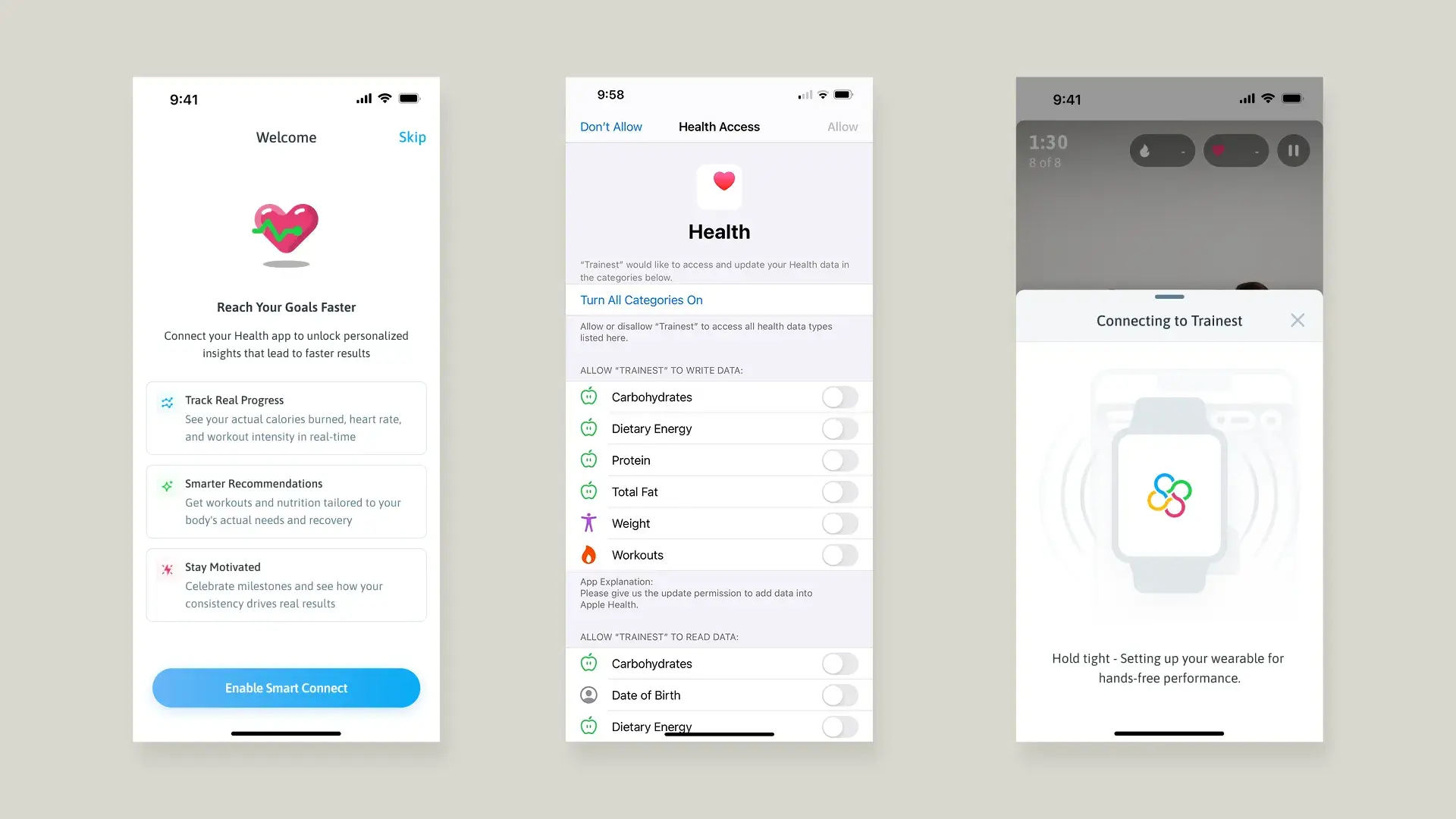
- The reasonReach Your Goals Faster
- The askApple’s Health sheet
- The payoffConnecting to Trainest
Connecting Apple Health unlocks actual calories burned, heart rate and workout intensity. So it’s framed as “Reach Your Goals Faster”, not as a permissions request. Benefit first, not ask first.
Try it
Bookmark it while signed in, then sign out.
People logged out and their streets still showed as bookmarked, because nothing checked for a session before rendering. The fix was a session check that resets the bookmark on logout. UI state isn’t just checked or unchecked. It depends on session, sign-in and what’s saved.
Where it shows up
| What | Product | Needs | How it’s handled |
|---|---|---|---|
| Apple Health data | Trainest | The client’s consent | A reason screen first, then Apple’s sheet. Skip is one tap away. |
| Bookmarks | Spotta | An active session | Checked before rendering, reset on logout |
| Client conversations | Trainest | A trainer on the team | Full history, so any trainer has context |
| Client ownership | Trainest | One assigned trainer | An assignment badge in the client pipeline |
| Reviews and street data | Spotta | Rules in the database | Supabase Row Level Security policies |
Rules
- Say what access unlocks before the system asks.
- Put Skip on the same screen as the ask.
- Check the session before rendering anything personal.
- Enforce access in the database, not just the interface.
- Open with the system sheet and hope for a yes.
- Let personal state outlive the session.
- Hide a button and call it a permission.