
Making the system part of how we ship.
ecoPortal’s product decisions lived in Figma, in code, in documents and in people’s heads, and they disagreed. I’m making the design system the place those decisions are made and kept, and Invites shows it working: explored, tested and scoped in a living prototype before it went to build.
Project details
- Rules signed off
- 82Component descriptions, written for people and AI, reviewed by the team
- Tokens
- 126 → 23 → 158Primitives, client themes, semantic
- Code Connect
- 101Components mapped between React and Figma
- Commits
- 914Since May 2026
- Scope
- Stack
“Success” was wired to the brand colour.
Re-theming the product for a client would have recoloured every success state. Splitting the fixed status colours from the themable brand ramp fixed it before a client ever saw it.
The problem
Decisions lived in too many places.
ecoPortal is an enterprise platform for environment, health, safety and quality. It has grown to about fifty modules, and almost everything in it is a record: a page with a status, an owner, due dates and steps, kept in a register people filter and sort. Frontline staff fill records in, managers track them, and administrators configure the whole thing, all in one product.
That shape is the opportunity. Fifty structurally similar workflows should feel like one product. Get a record right once, and every module inherits it.
It wasn’t working that way. Decisions were spread across Figma, Storybook, code and people’s memory, and the product was moving from Angular to React at the same time. The cost showed up as inconsistency, slower delivery, and the same conversations happening again and again.
The challenge wasn’t a better component library. It was making the system useful at the point where product decisions and implementation actually happen.
My role
Design systems, AI and prototyping, across the team.
I joined in May 2026 as Senior Product Designer, Design Systems and AI. I look after the system in Figma and in code, and I work across it with designers, product managers and engineers.
In practice that means three jobs that used to be separate: the foundation everyone builds on, the tooling that carries its rules into the build, and the prototypes where features get decided before they’re built.
The foundation
A common language first.
Every piece of the foundation was a decision about making the system usable, not just complete.
One token language, three tiers
126 primitives say what a value is. 23 brand variables carry each client’s theme. 158 semantic tokens say what a value is for, and those are the only ones components touch. Re-theming a client changes one layer and nothing breaks.
Five Figma libraries, mapped to React
The libraries are bound to the tokens down to the variant level, and 101 components are mapped between React and Figma with Code Connect. A designer and an engineer looking at the same button are looking at the same thing.
Rules for keeping it that way
Written policy for versioning, UI copy and layer naming, each signed off by the designers who use it. No hardcoded values anywhere: a check rejects them before they’re committed.
Into delivery
Rules that people and AI both follow.
A consistent library wasn’t enough at ecoPortal. The system only changes how a team ships if its rules reach the moment a feature is designed and built, and more and more of that moment now involves AI.
AI agents read documentation literally. “Use the primary button for the main action” is fine for a designer, who fills the gaps from experience. An agent guesses. So I rewrote the component documentation as rules precise enough to check: what a component is for, what it’s never for, how many can appear in a view, which tokens it uses. A rule an agent can follow is a rule a person can check.
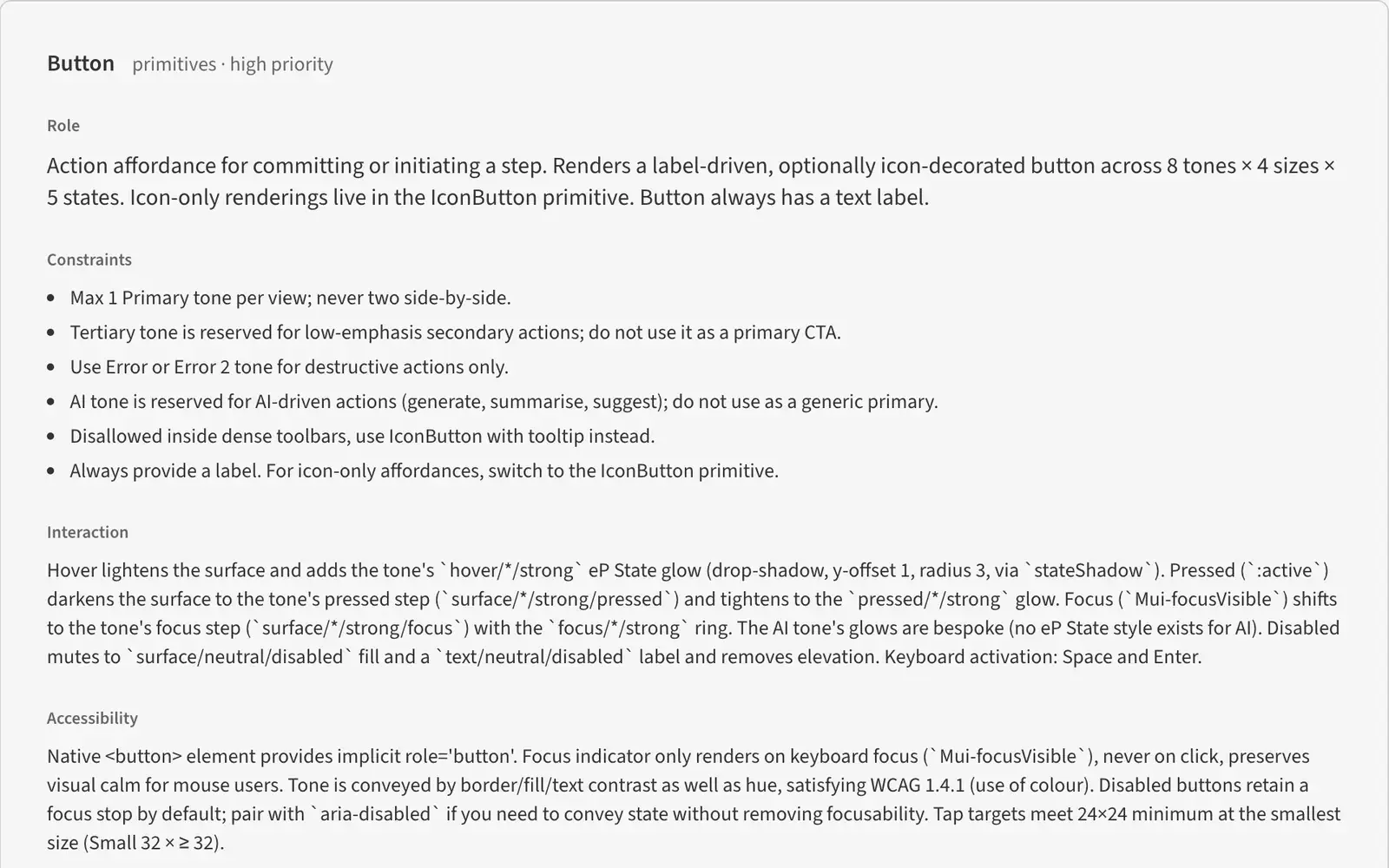
The team reviewed all 82 descriptions on a review platform I built for it, because they weren’t just approving text. They were agreeing to a new way of writing the system down.
Then the rules had to travel. Each one lives where it will be read:
Checked automatically
Reviewed by an agent
Carried by skills
The test I hold it to: if a teammate’s AI has to be lucky to read a rule, the rule is in the wrong place.
The same discipline holds for moving the system itself. One run rebound 6,095 Figma bindings onto the new token library with zero misses, after a dry run first.
Invites, settled before the build.
eP Playground is where features get decided now: a living prototype, built from the real system, where design, product management and the people who hear client complaints first hand work out a feature together before engineering commits to it. Invites, how organisations bring people into ecoPortal, is the clearest example.
The old flow was a five-step wizard, and its requirements were a year-old draft being rewritten. Here’s how it came together in the playground instead:
Throw away the first pass
The first version I built rebuilt today’s flow, screen for screen. I withdrew it the same day. The project was a revamp, and parity would have shipped the old pain points with new styling.
Test the requirements before the screens
A review of the existing designs against the requirements found one contradiction, seven gaps and four risks, and five decisions only product management could make. All before a screen was settled.
Five passes in five days
Who to invite, filling in details for a whole batch, reusable preconfigured invites, and tracking and chasing invites, each built as working screens. Where the right answer wasn’t obvious, the options sat side by side, and switches in the prototype tested the edge cases: one invite or many, a manager who can only read, a batch with errors still in it.
Absorb the scope change in a day
When the requirements were narrowed to one way in, the prototype matched within a day. The other ways in weren’t thrown away. They became Phase 2, already explored.
Decide in the room, then hand over
Admin approval came out of the flow. Invitations moved into People Manager instead of living on their own. Feedback from the team was logged by theme, so a point raised twice was easy to spot. Each phase went to Figma for build with its scope already settled.
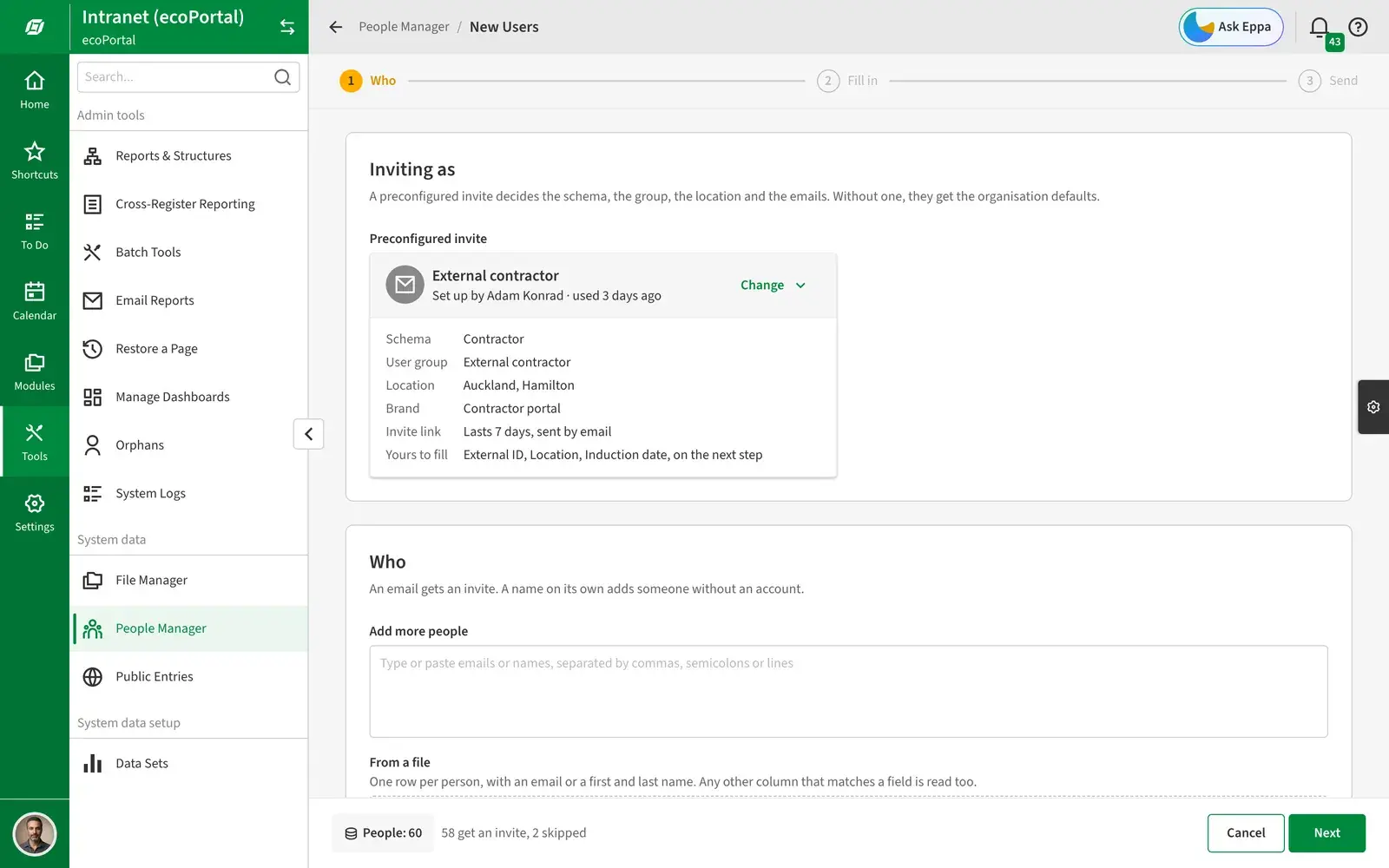
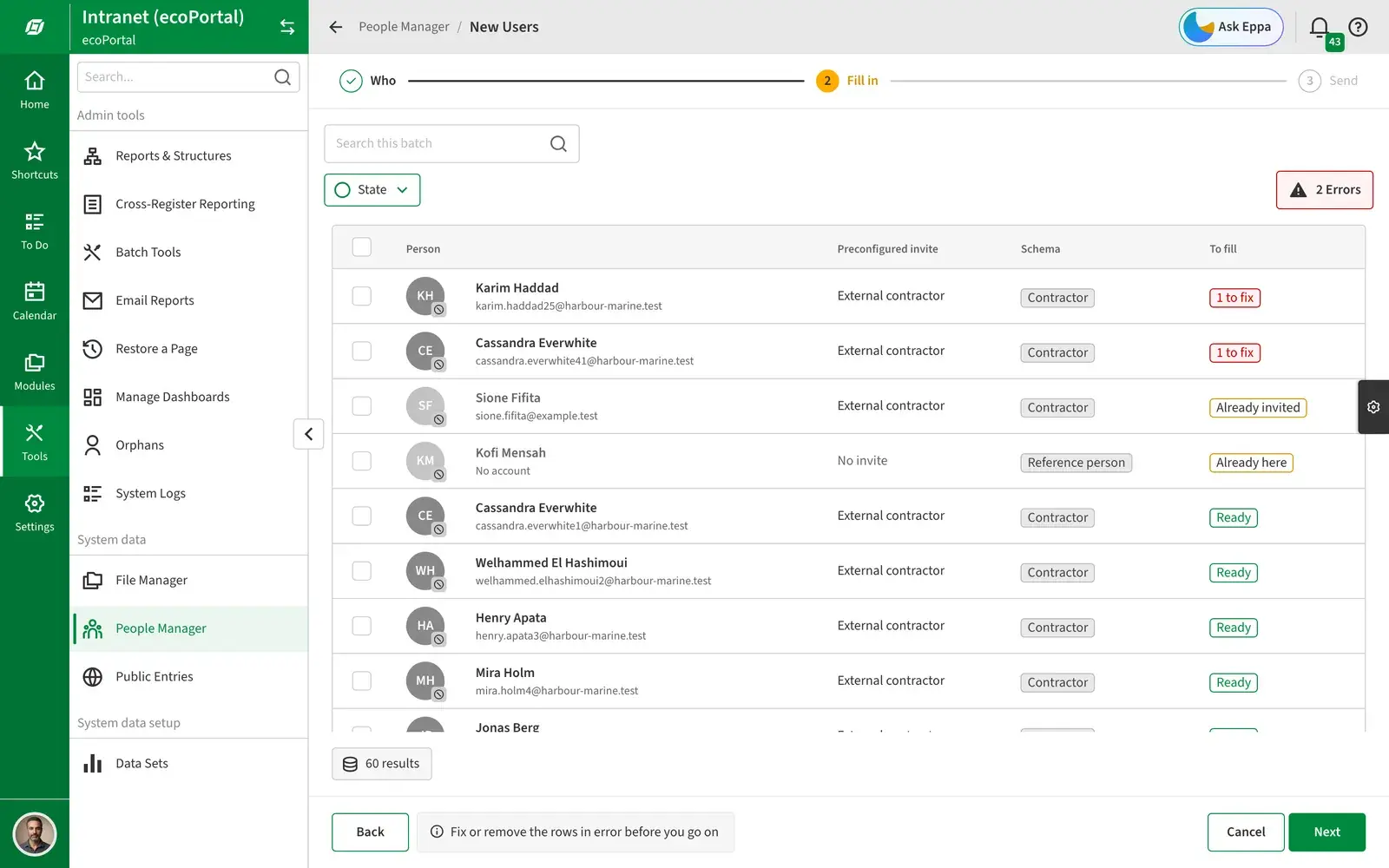
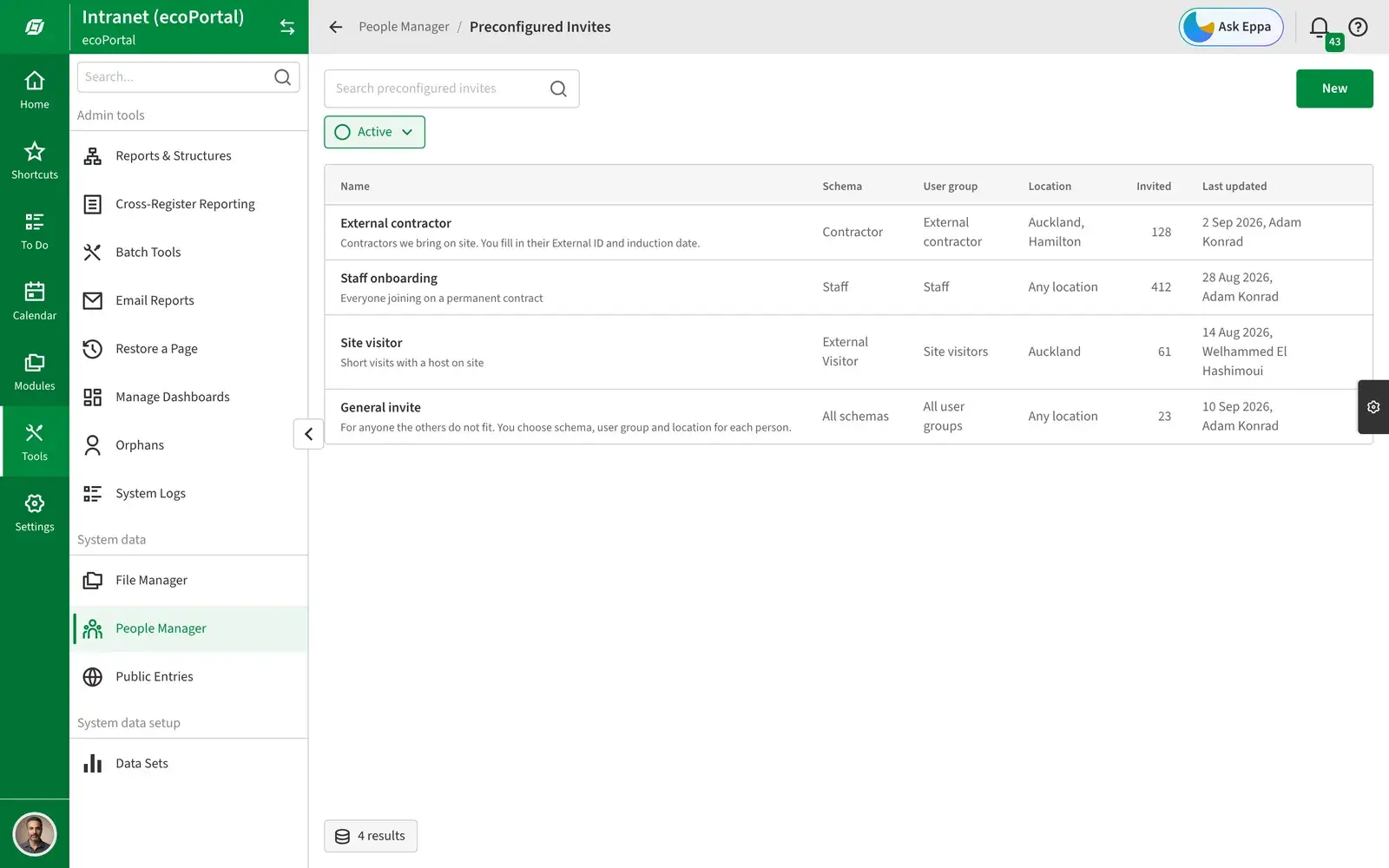
What changed
How we ship is changing.
The system is now part of how features get made, not a library people consult afterwards. It has us rethinking the product lifecycle around AI and rapid prototyping.
- Explorations are much quicker. Ideas become working screens in days, not weeks of static frames.
- Testing and feedback happen early, before design and development builds start.
- Edge cases get tested, not imagined, and scope is concrete instead of abstract.
- Scope arrives settled. When the Invites requirements narrowed, the prototype matched within a day, and each phase went to build with its scope already agreed.
The cost is real. Writing a rule takes longer than writing a paragraph, and it has to be agreed before it ships. Adoption is the payoff.
What’s next
A practice, not a finished library.
This work is ongoing. The goal isn’t a more complete design system. It’s a product practice where teams can explore, decide and build with more shared context, and where the system carries the decisions from one stage to the next.