
Honest street reviews for Lagos. From zero to live.
I designed and built Spotta, Nigeria’s first street review platform, from concept to production in under two months. 1,590 streets. 1,083 reviews. 28 neighbourhoods. Next.js, Supabase, and AI tools turning Figma files into live code.
Project details
- Streets
- 1,590Across 28 neighbourhoods in Lagos
- Reviews
- 1,083From real Lagos residents
- Recalculations
- 150+ to3Per page load
- Scope
- Concept → Design → Full-stack build
- Stack
One star for everything became one rating per category.
The first review form asked for a single rating. The rebuild gives every selected category its own: stars for quality, a frequency picker for flooding and noise.
Read the Review forms patternThe problem
Moving in Lagos is a gamble.
When someone in Lagos is looking for a place to live, they’re asking real questions: Does this street have stable power? Does it flood? Is it safe at night? Is the water situation manageable? There’s no reliable way to find out. You ask around, you visit, you hope. Google Maps tells you the street exists. Not whether the power supply will keep your fridge running.
I wanted to build the platform that answers those questions. A “Yelp for streets” where real residents review infrastructure (power, water, security, roads, flooding, internet, noise, and environment) so the next person moving in knows exactly what they’re getting into.
The catch? I’m a product designer, not a full-stack engineer. I’d need to design the product, build the front-end, configure the database, handle authentication, manage street data for an entire city, optimise for search engines, and ship it live. So I used AI as my engineering partner.
The data challenge
Before designing screens, I needed streets.
A street review platform is only as good as its street data. I needed structured, accurate records for thousands of Lagos streets (name, area, local government area), organised in a way that prevents duplicates and supports search. Three approaches, each with tradeoffs:
Google Maps API: too expensive
The obvious choice. Google’s Places API has excellent Lagos coverage, but the pricing at scale made it a non-starter for a bootstrapped civic project. Every search query, every place detail call. Costs add up fast when you’re covering an entire city.
OpenStreetMap: the normalisation trap
Free and open. I implemented OSM search so the homepage fetched from OSM, and streets would only be created in my database when a user left their first review, keeping the database lean. But I immediately hit a critical problem: boundary inconsistencies. The same street appeared under different area names depending on which OSM boundary polygon contained it. A street on the edge of two neighbourhoods could show up twice with different parents. This defeated the entire purpose of a structured review platform.
Build my own system, with AI deduplication
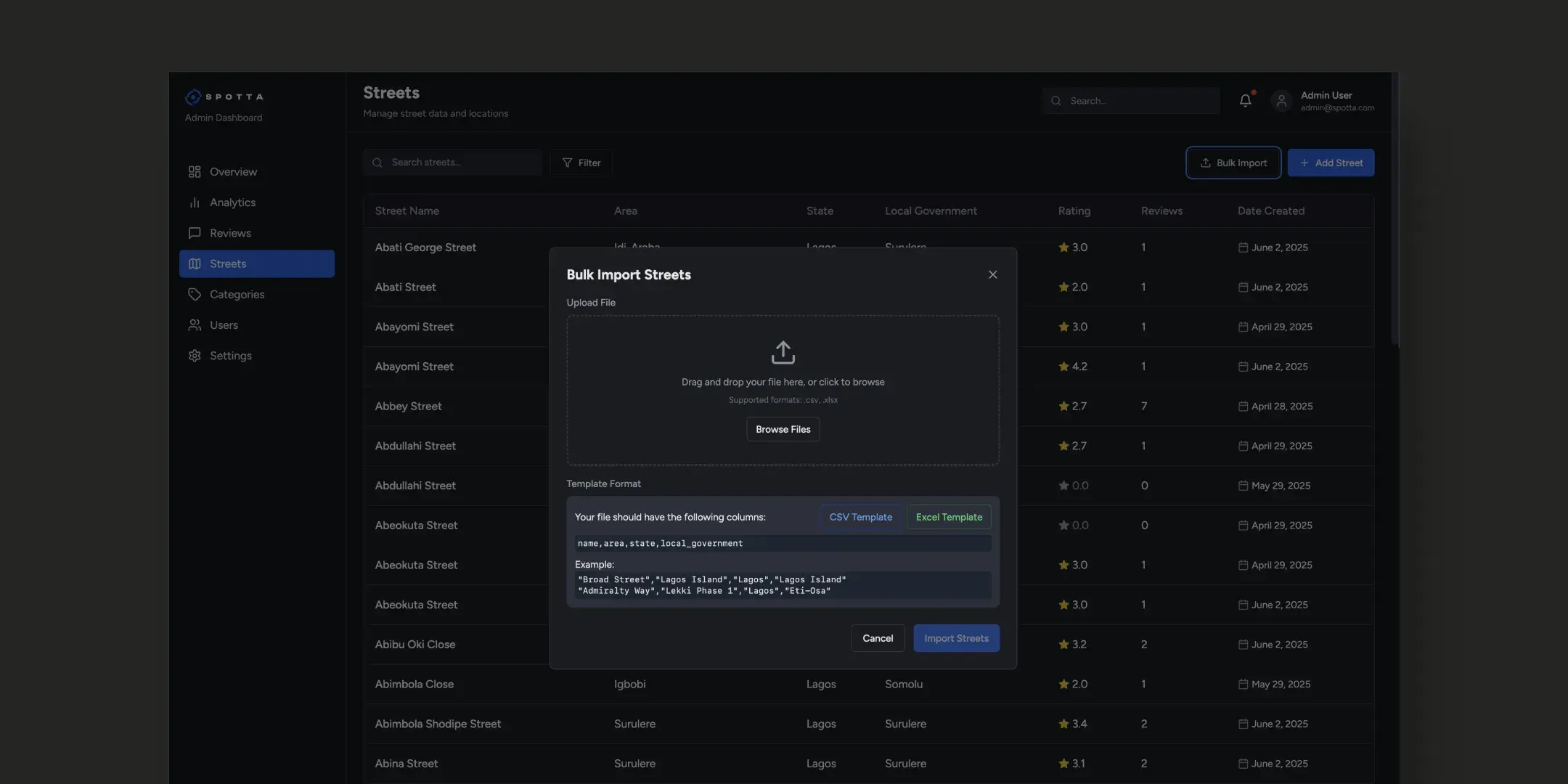
I built an external tool using AI to scan the OSM-sourced data, find and flag duplicates across boundary zones, and present them for manual resolution. I’d resolve the conflicts, export clean data to XLSX, then bulk-import it through my admin dashboard. Way faster than adding streets individually. And the data was mine to control.
Design evolution
The review form I shipped first was wrong.
The first version of the review form let users select multiple categories (Parking Lot, Nightlife, Hospitals…) but only give one overall star rating. This felt simpler, but the data it produced was useless. A street with great security but terrible roads would get 3.5 stars. And that number tells you nothing about either.
After user feedback, I rebuilt the form so every selected category gets its own rating. Each user’s individual category ratings combine into their overall score, and those aggregate into the street’s per-category breakdown. Now when you look at a street page, you see Security ★4.5, Power ★3.3, Roads ★2.0, information you can actually act on.
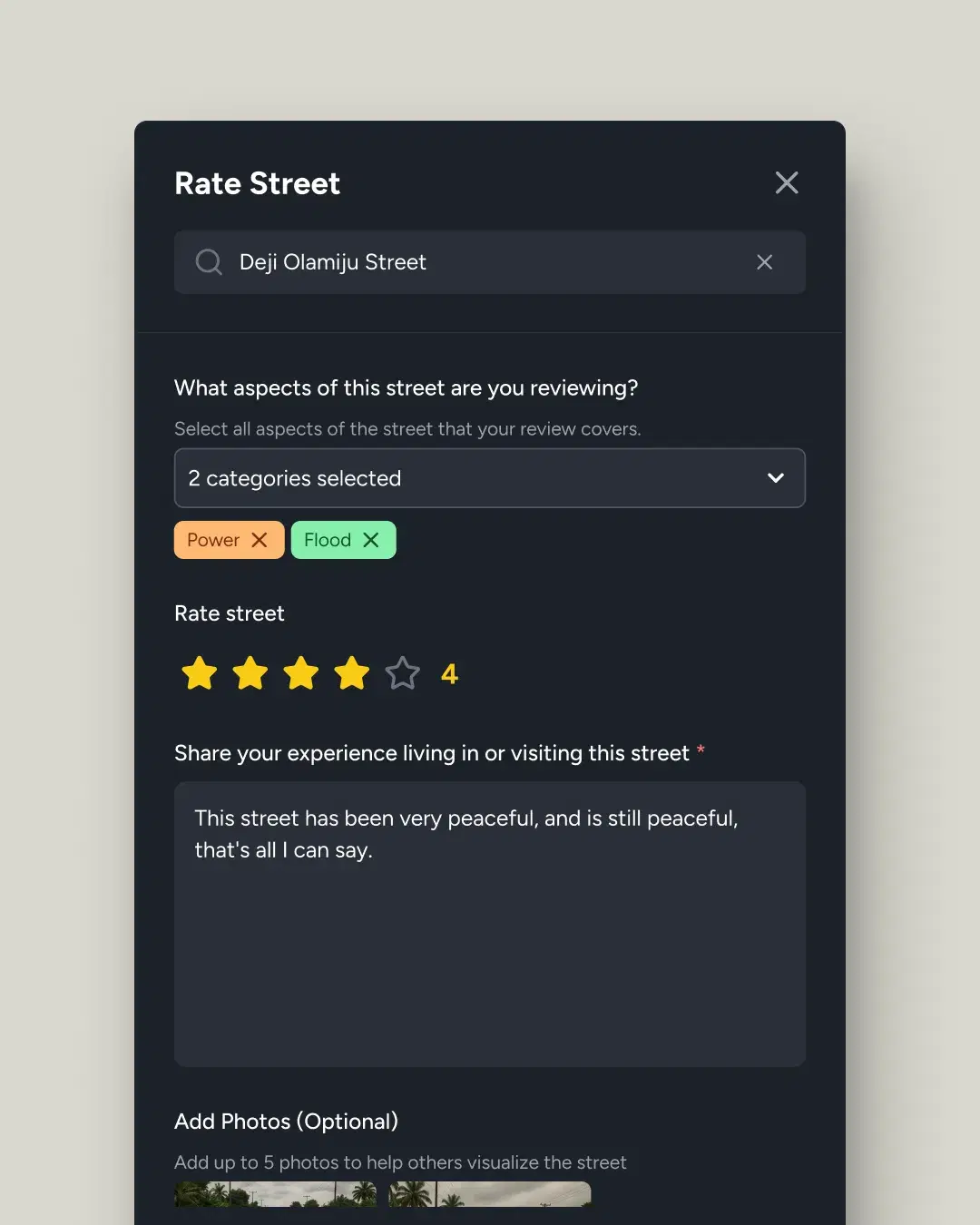
Users pick categories but give one star rating. Simple form, but produces a meaningless average that masks what actually matters about a street.
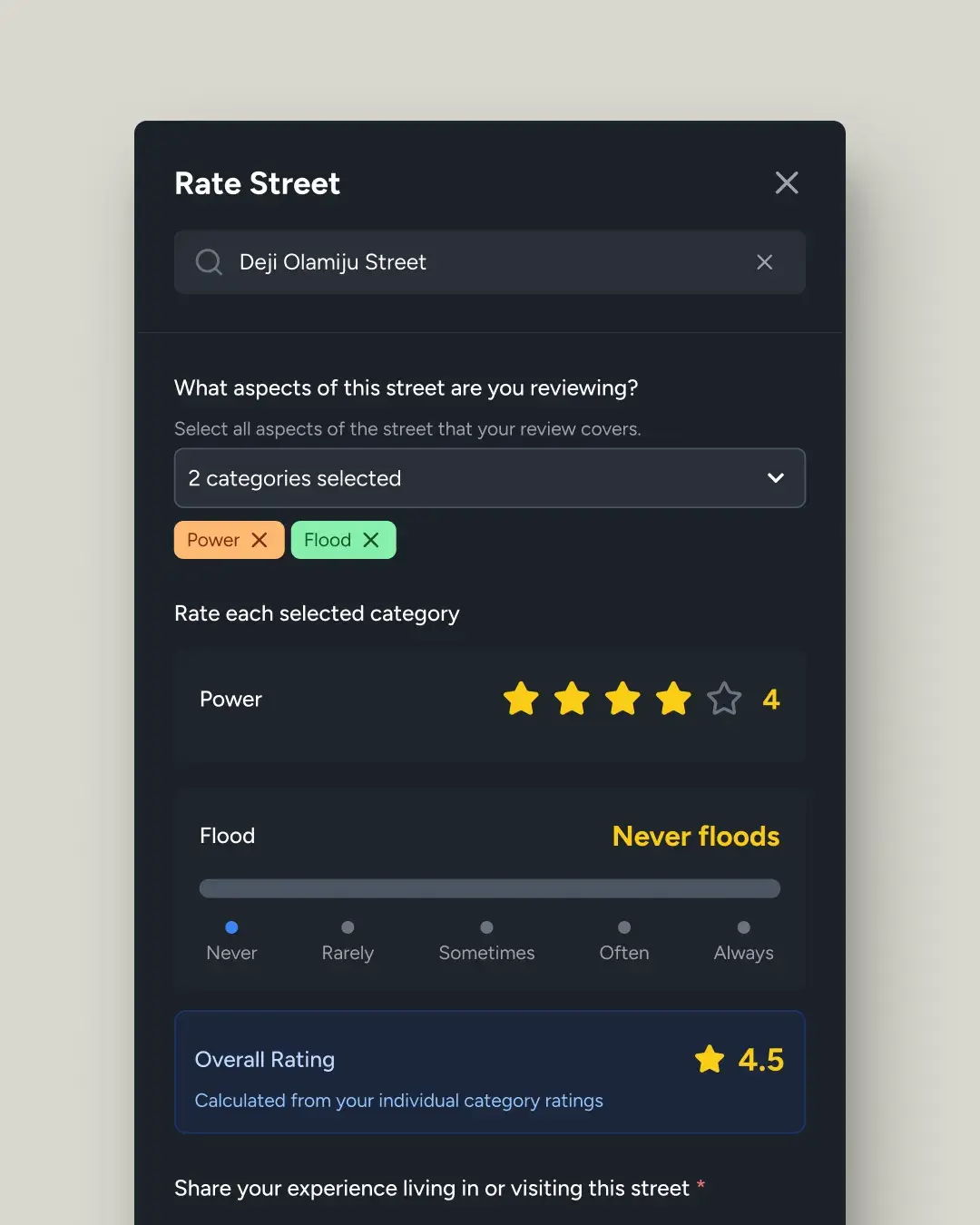
Each category gets its own input. Stars for quality metrics (Power, Security). Frequency sliders for yes or no phenomena (Flood: Never → Always, Noise). Overall auto-calculated.
The frequency problem
Not everything is a star rating.
When I started implementing per-category ratings, I hit a design problem: flooding isn’t a quality you rate on a scale. A street either floods or it doesn’t, with frequency in between. Same with noise. You don’t give noise “4 stars”. That doesn’t mean anything.
The solution was contextual input types. Power, water, security, roads, and internet use star ratings, because quality is what matters. Flood and noise use frequency sliders (Never → Rarely → Sometimes → Often → Always). The slider maps to a value from 0 to 5: “Never” = 5 (best), “Always” = 0 (worst). This lets the system compute a meaningful aggregate while giving users an input that matches how they actually think about the data.
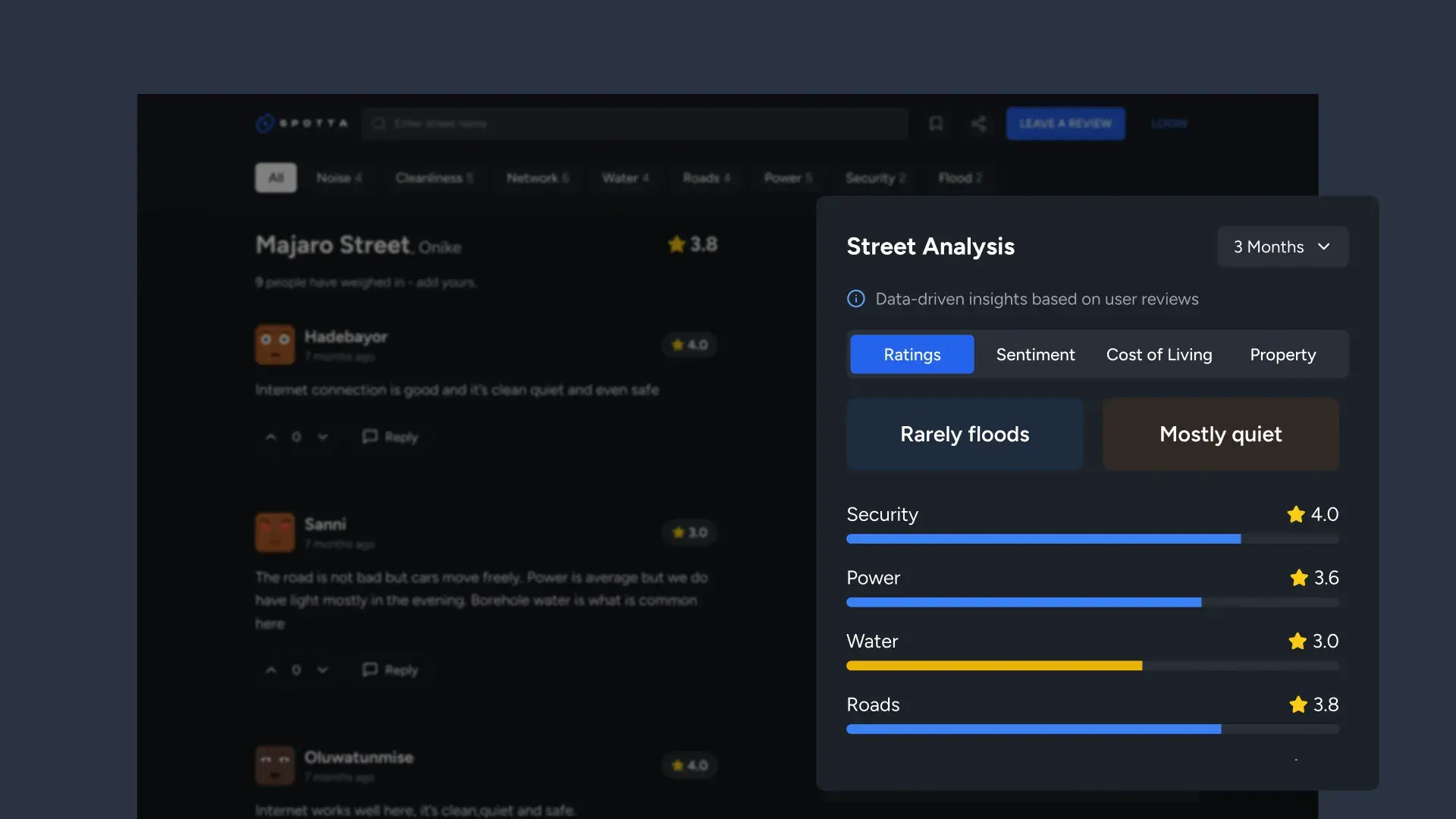
On the street page, these render differently too. Stars show as bar charts with numeric ratings. Flood and noise show as badges: “Never floods”, “Mostly quiet”, human-readable summaries derived from aggregate slider positions.
The street page
A dashboard for every street in Lagos.
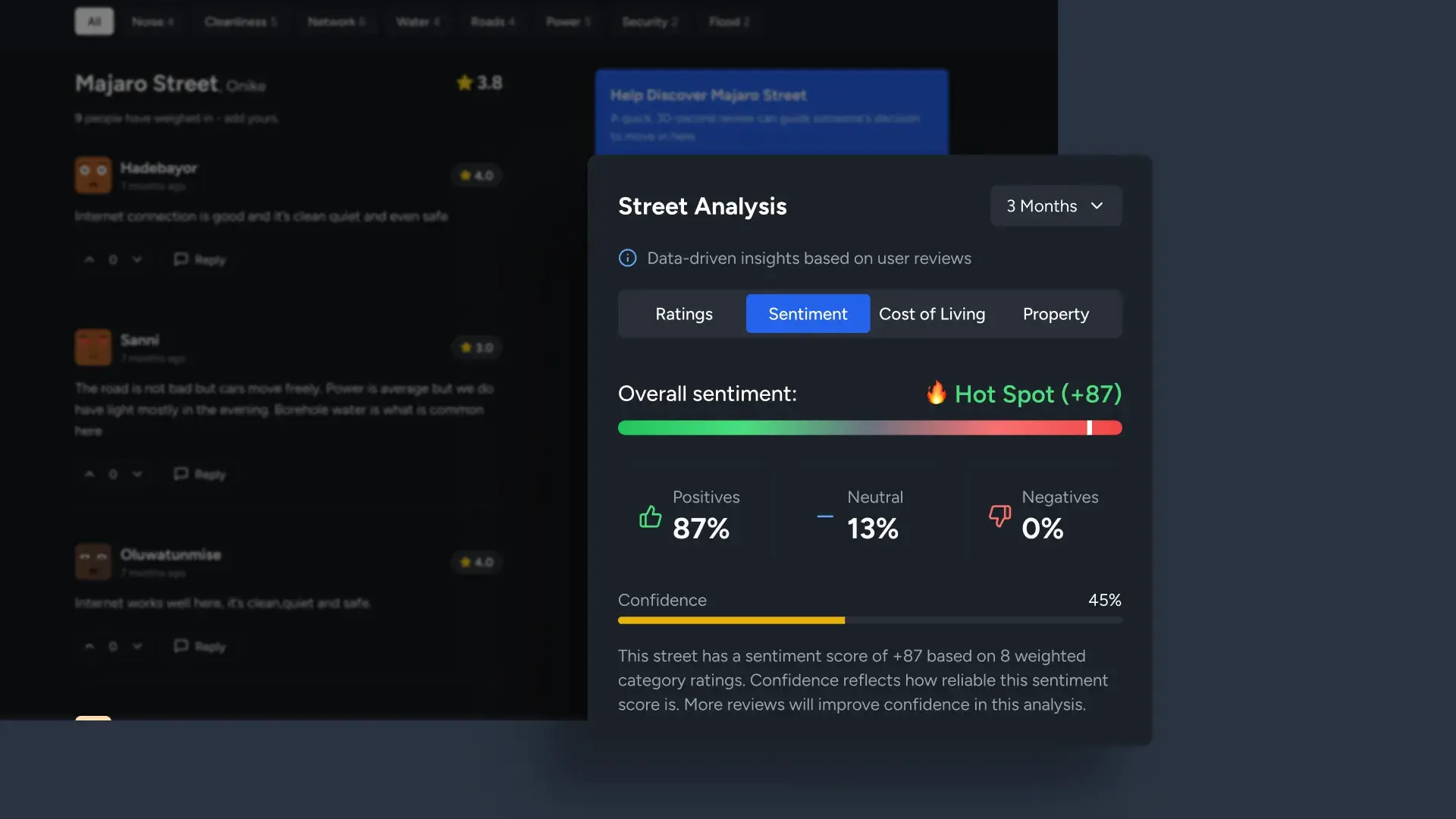
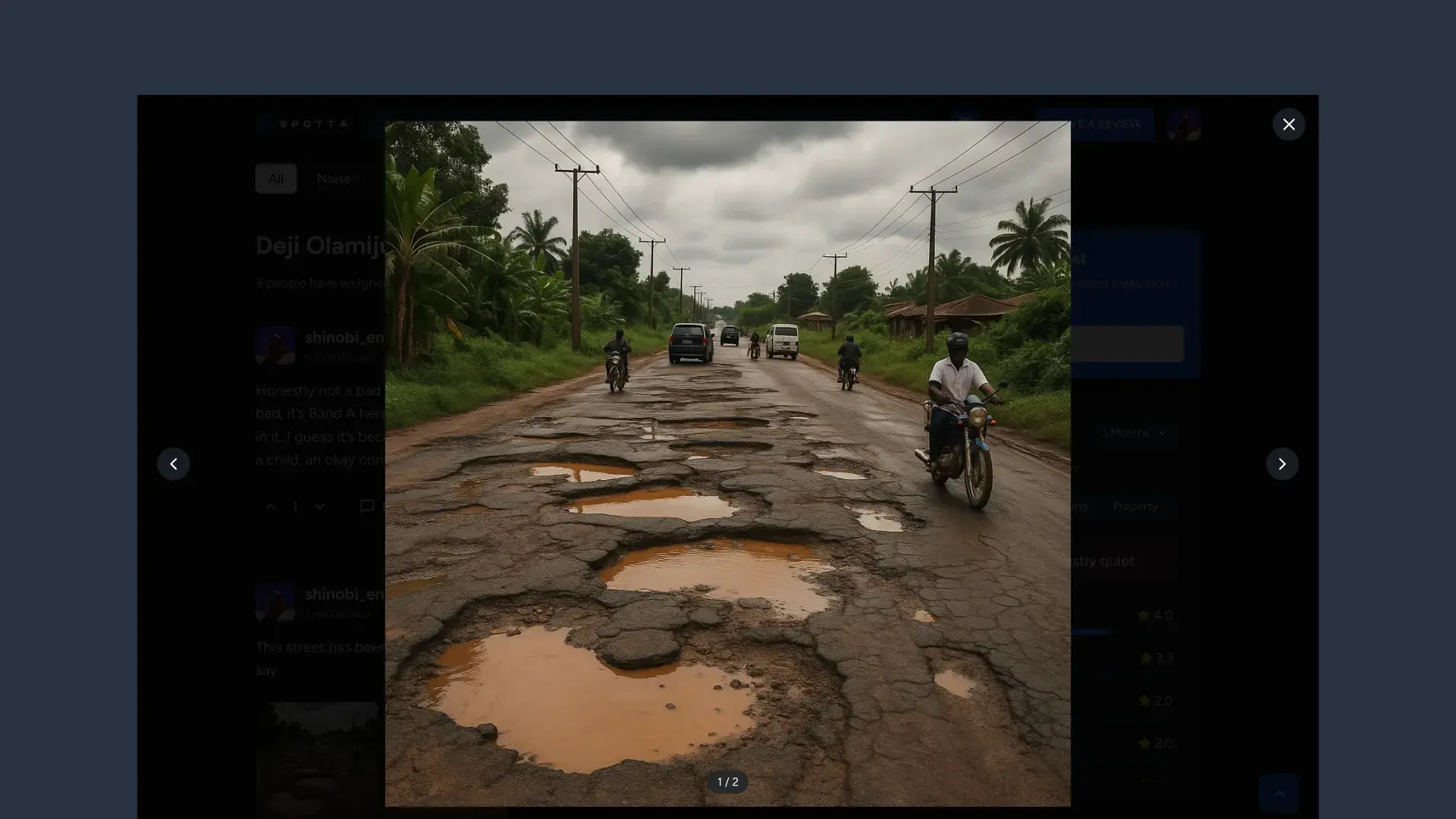
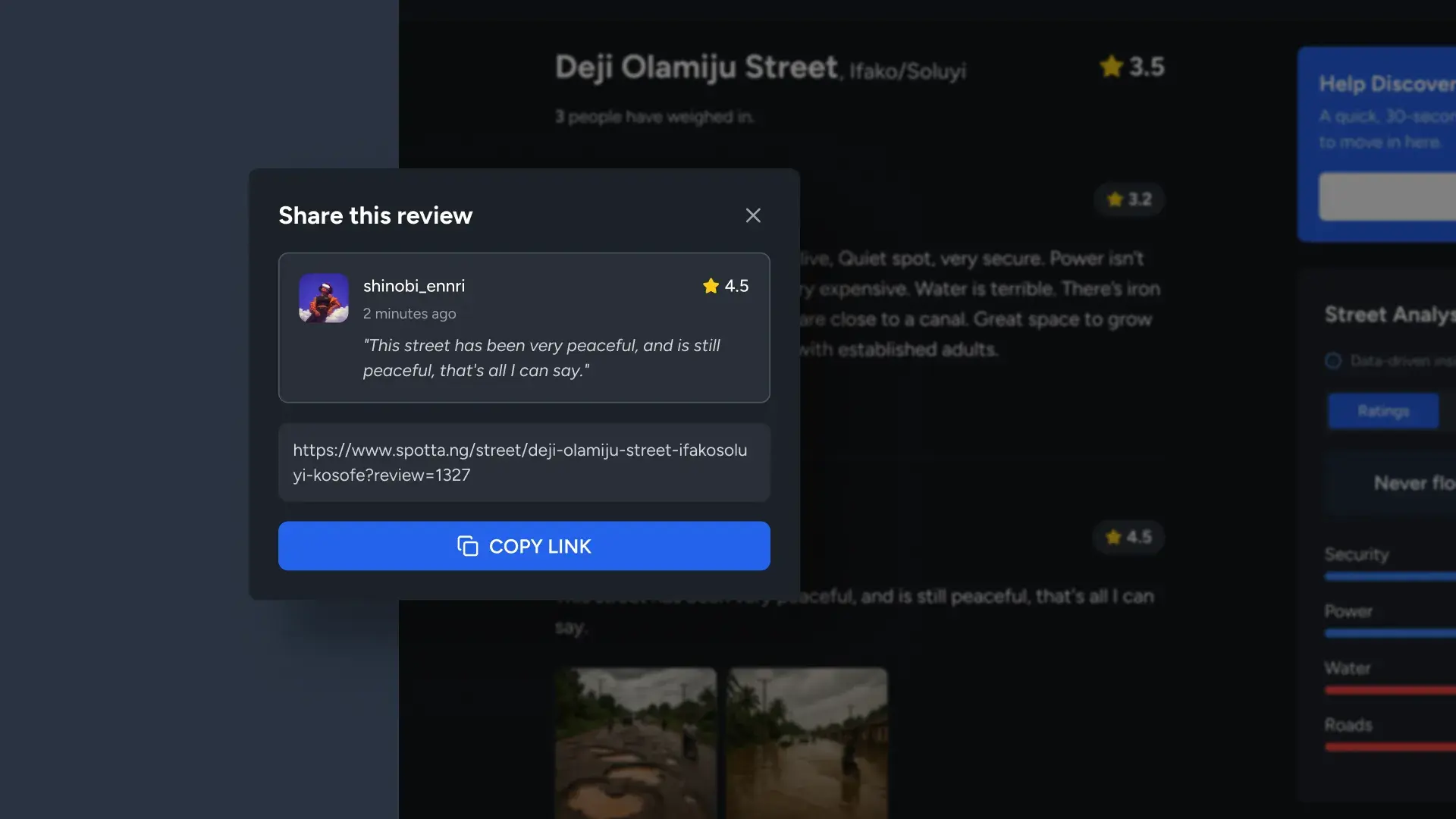
Each street page is a living profile: reviews with threaded replies, category filter pills, photo uploads with lightbox, a shareable deep link per review, and the Street Analysis sidebar with ratings, sentiment analysis, cost of living, and property tabs.
Technical gauntlet
The problems that made me a better builder.
Building a production web app from a design background meant solving problems I’d never encountered in Figma. Each one taught me something about how software actually works, and made me a sharper designer for it.
The authentication puzzle
Google OAuth redirects users away from the app and back. During that redirect, the system lost track of profile creation: accounts existed but profiles didn’t. The fix: localStorage flags written before the redirect, checked on return. Now every Google sign-in creates a complete profile with auto-generated avatar and username derived from email.
localStorageThe speed problem: 150+ calculations per page load
Avatar display was recalculating the image source for every review on every re-render. With 20 reviews on a page, that’s 20 recalculations per state change. I learned about memoisation: calculate once, remember the answer, only recalculate when the source data changes. Went from 150+ calculations to 2 or 3 per page load.
The SEO breakthrough: client-side to server-side rendering
With client-side rendering, Google saw empty pages: all content loaded after JavaScript executed. Search engines couldn’t index the reviews, ratings, or street data. I migrated to server-side rendering so pages arrive fully formed with structured data (JSON-LD). Now searching “Allen Avenue Ikeja reviews” can surface Spotta with star ratings directly in Google results.
The bookmark ghost: state persisting after logout
Users would log out but bookmarked streets still appeared bookmarked. The system wasn’t checking for an active session before rendering bookmark state. A small detail, but one that erodes trust. The fix was a session check that resets bookmark UI on logout. Designing the code taught me how much “trust” lives in tiny state management details.
Admin dashboard
The admin dashboard: controlling the data.
Managing 1,590 streets and 1,083 reviews across 28 neighbourhoods requires tooling. I designed and built a full admin dashboard (overview analytics, area-level drill-downs, street management with inline review previews, category configuration, and user management), all with the same AI-assisted development workflow as the public site.
Overview dashboard
Area analytics
Street management
Category performance
Bulk import
Category config
User experience
Building a community, not just a tool.
A review platform dies without contributors. I designed a user system that rewards participation: profile pages with review history and activity stats, a contributor level system (Neighborhood Scout → levelling up), and achievements.
First Steps, Regular Contributor, Area Explorer, Well-Rounded (review across 4+ categories), Monthly Enthusiast. Think Google Local Guides, built for Lagos streets.
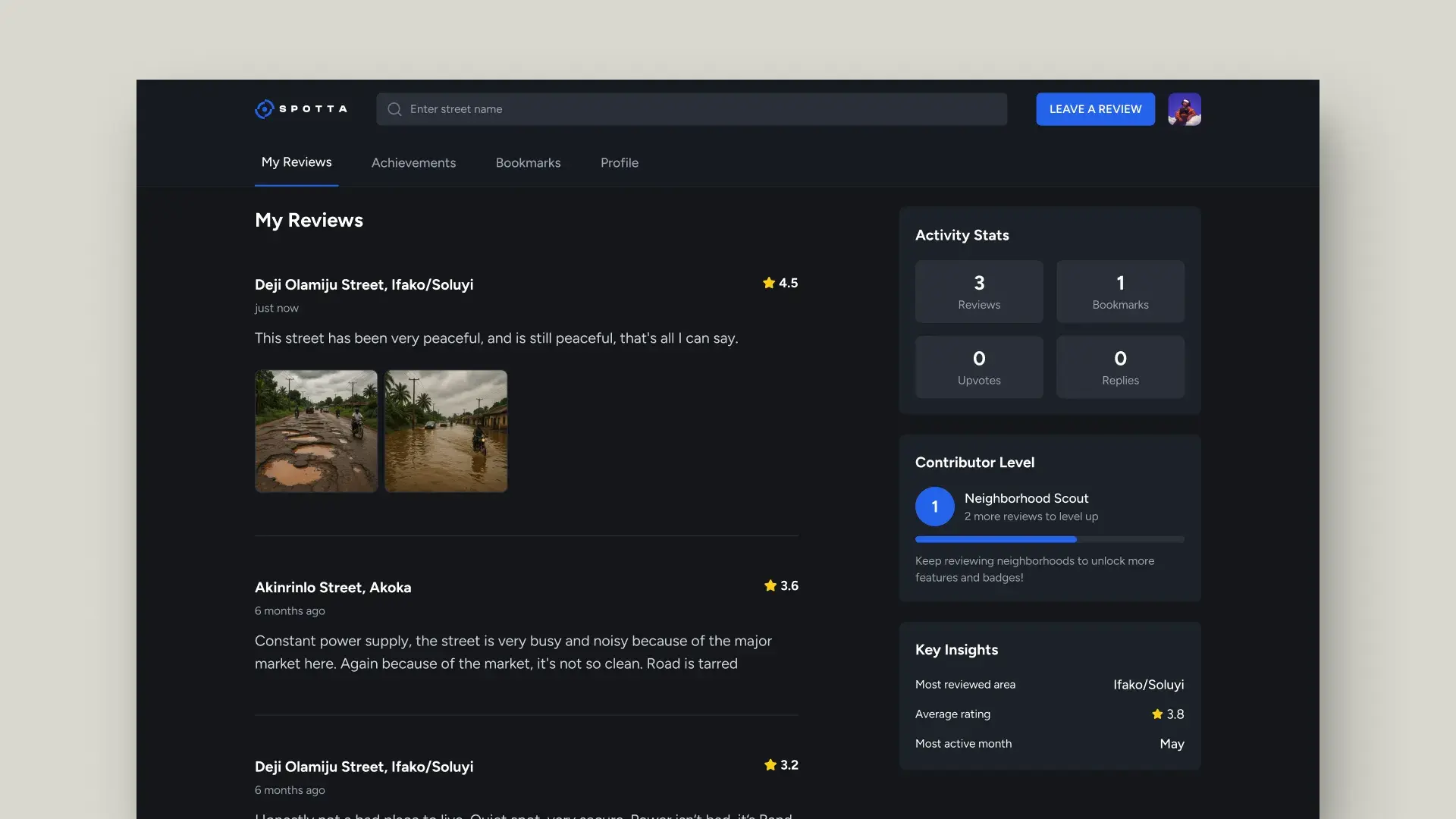
Your review history, your impact
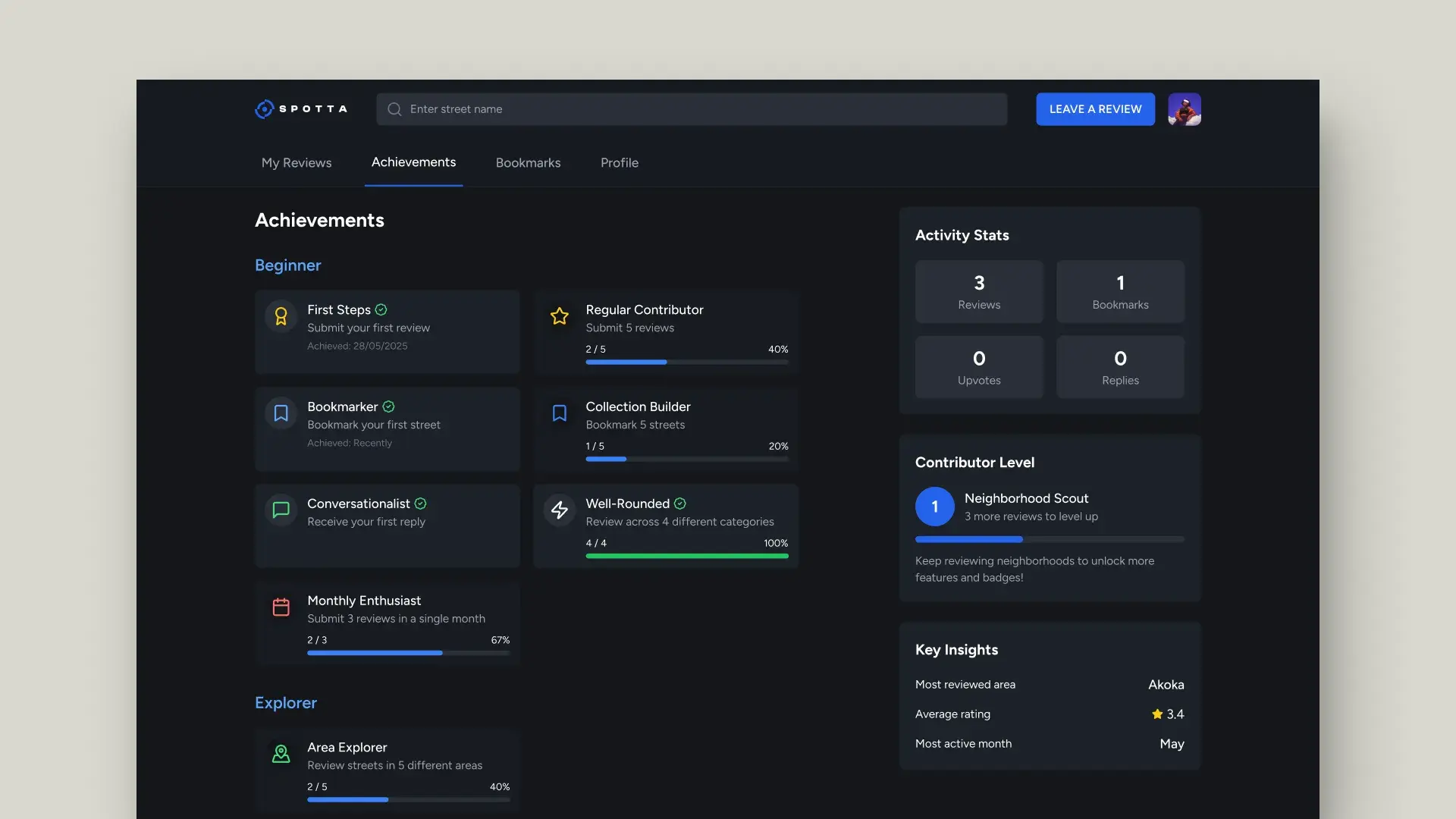
Motivating local guides
How I built it
Figma → AI → Production.
I’m a product designer who leverages AI to ship. The workflow: design in Figma, then use v0, Claude, ChatGPT, and Trae to convert designs into production code. v0 handled initial component scaffolding. Claude and ChatGPT helped me solve backend logic I’d never written before: Row Level Security policies, OAuth flows, database migrations. Trae helped with iteration speed.
This isn’t “AI built my product.” I made every product decision, designed every screen, and directed every implementation. AI was the engineering team I didn’t have. And learning to collaborate with it made me understand code in ways that fundamentally changed how I design. I now think about state management when I design interactions, data models when I design information architecture, and rendering strategies when I think about SEO.
- Next.js
- Supabase
- Figma
- v0 · Claude · Trae
Outcomes
Live in production. Real users. Real data.
Reflection
What building taught me about designing.
Spotta changed how I work. Before this project, I was a product designer who handed off specs. After Spotta, I’m a product designer who understands what happens after the handoff, and that understanding makes every design decision sharper.
State is a design material
Data models shape UX
Performance is a feature
SEO is information architecture
I didn’t build Spotta to become a developer. I built it because the product needed to exist. And I learned that a designer who can ship is a designer who can think about the whole problem.